Beta · in your browser
Make an intro edit, here.
A live band, an old record, anything that speeds up and slows down. Drop it in and get back a copy on a steady BPM, with its beatgrid already set for Serato. Your original is never touched.
In beta — we’re still testing it, so it may change, or be taken away. Not quite right?
0:00
This record already holds a steady tempo, so the copy sounds the same as your original. Downloading it is free, and it still gets a Serato grid. To have it at another tempo, change the BPM below.
1Hear it in time
The click should sit on the kick, start to end. On Original you'll hear the record drift off it.
Its tempo, start to end
Original — how it wandered Quantized — steady all the way. Click the graph to hear that part.
2The BPM
Change it with the arrows or type it — you'll hear it at that speed straight away, metronome and all. It's made at that BPM when you download.
3Download it
Create a free account to download it
Three finished edits a month, free. No card.
Your quantized edit's ready. Go Pro to download it.
You've used this month's three free edits. Pro is unlimited, so you can do your whole crate: £9.99 a month, about 33p a day. Cancel any time, and every edit you've made is yours to keep.
New Acapella In and Out. Start the song with just the singing, or end with the singer on their own. Pick Acapella before you set the drop or the outro.
-
Drop in a track
One you already own — MP3, WAV, AIFF, FLAC, M4A or any other audio file.
-
Find the drop
Put the moment it kicks in on the white line, then press Set the drop here.
-
Build the intro
8, 16 or 32 bars, made from the track's own audio. Add an outro if you want one.
-
Listen, then keep it
Hear it first. Three a month free — sign up only to download.
Got a whole crate? This page does one track at a time. For a batch of up to 10 with the same intro, download the app.
Best tempo and beatgrid Analyse the track in Serato first — or any DJ software that saves the BPM to the file.
Reading the track…
- Your whole crate, not three records a month
- £9.99 a month, about 33p a day
- Cancel any time from your account. Every edit you've made is yours to keep.
Your track is on our server having the vocal taken off it. It is deleted the moment the edit is made.
0.0s usually 5–30s · longer the first one after a quiet spell
Likely drop is a guess. It's worked out from the audio and won't always be right — press ▶ Play from drop and listen before you set it.
Only if the bar lines don't sit on the kicks: put the white line on a downbeat and press “The 1 is here”, or tap four times on the 1 to set the tempo by ear.
-
Intro
The song starts at the drop with just the singing. After the intro's length, the beat comes in and the song carries on.
Put the first kick on the white line — tap Likely drop on the waveform, or drag — then press Set the drop here.
Set the drop first — then pick how the intro goes.
Drop
IntroLead‑in offMore options
LoopThe intro repeats a short piece of the song. 1 bar = 4 beats. Stick with 8 unless the song has singing or a gap in it.
◂ ▸ moves it one bar. Or stop the song where you want it and press From the white line.
Made ofthe instrumental
StyleSet the point where the beat should stop. From there the singer carries on alone.
Starts
Finding the outro
Put where the record should hand over on the white line — ⤢ to end gets you there — then press Set the outro here.
Outro starts not setOutroMore options
LoopThe outro repeats a short piece of the song. 1 bar = 4 beats. Stick with 8 unless the song has singing or a gap in it.
◂ ▸ moves it one bar. Or stop the song where you want it and press From the white line.
Made ofthe instrumental
-
0:00 / 0:00 tap the waveform to move the playhead
Run-up The record, from the drop Lead‑in Outro
Adjust the lead‑in
Lead‑in offHow much of the words before the drop carry over the end of the run-up.
Create a free account to download it
Three finished edits a month, free. No card.
Your edit's ready. Go Pro to download it.
You've used this month's three free edits. Pro is unlimited, so you can do your whole crate: £9.99 a month, about 33p a day. Cancel any time, and every edit you've made is yours to keep.
Working from a crate? The app reads your Serato, Rekordbox, VirtualDJ and Engine DJ libraries, does ten at a time, renders on your own Mac and never waits for a server. Download it free.
That was one track. The app does your crate.
Same edit, made straight out of your DJ software — ten at a time, on your own Mac.
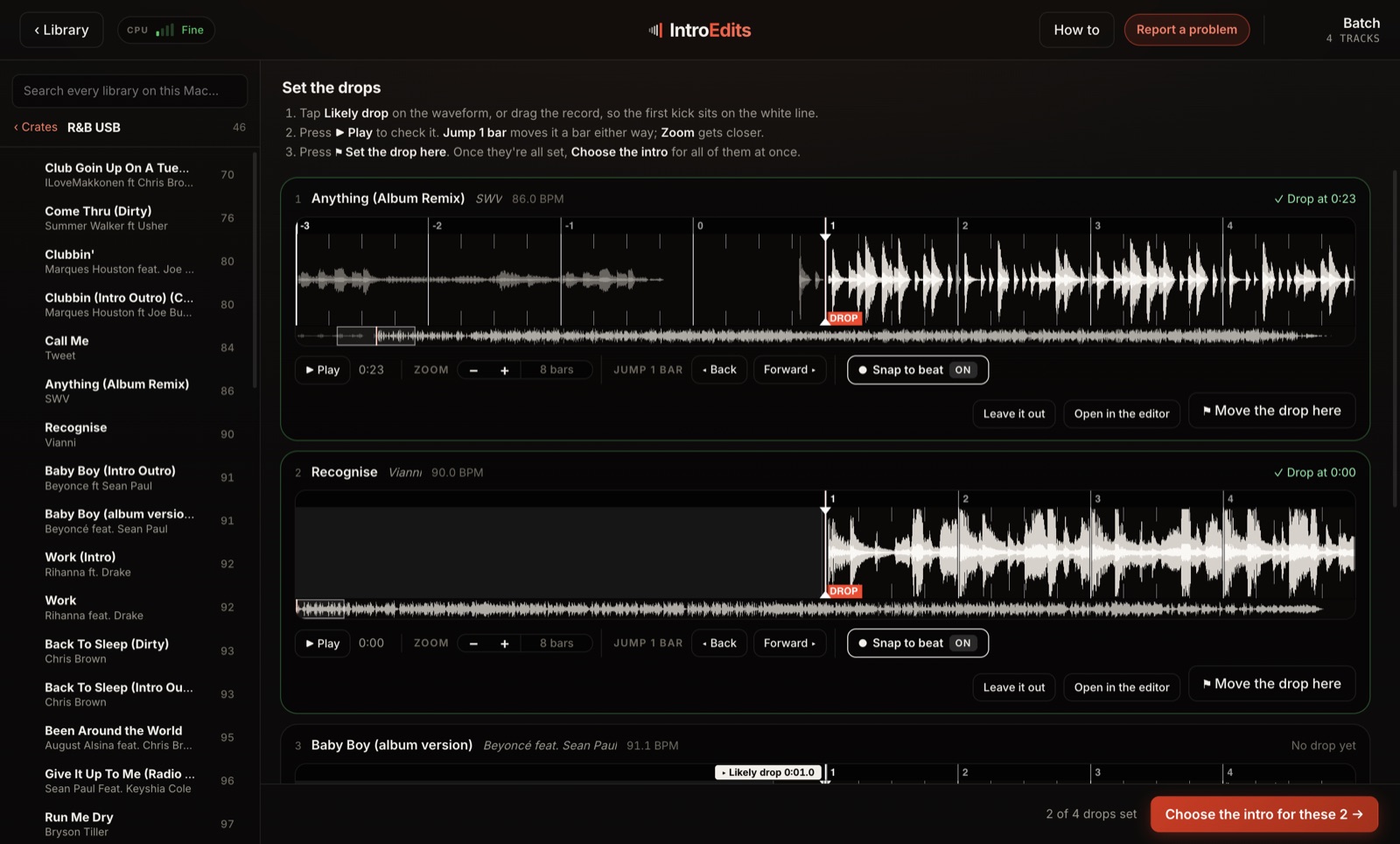
Ten drops on one screen
Tick up to ten tracks and they come up stacked, each with its waveform and its likely drop already marked. Check it, set it, next — then choose the intro once for all of them.
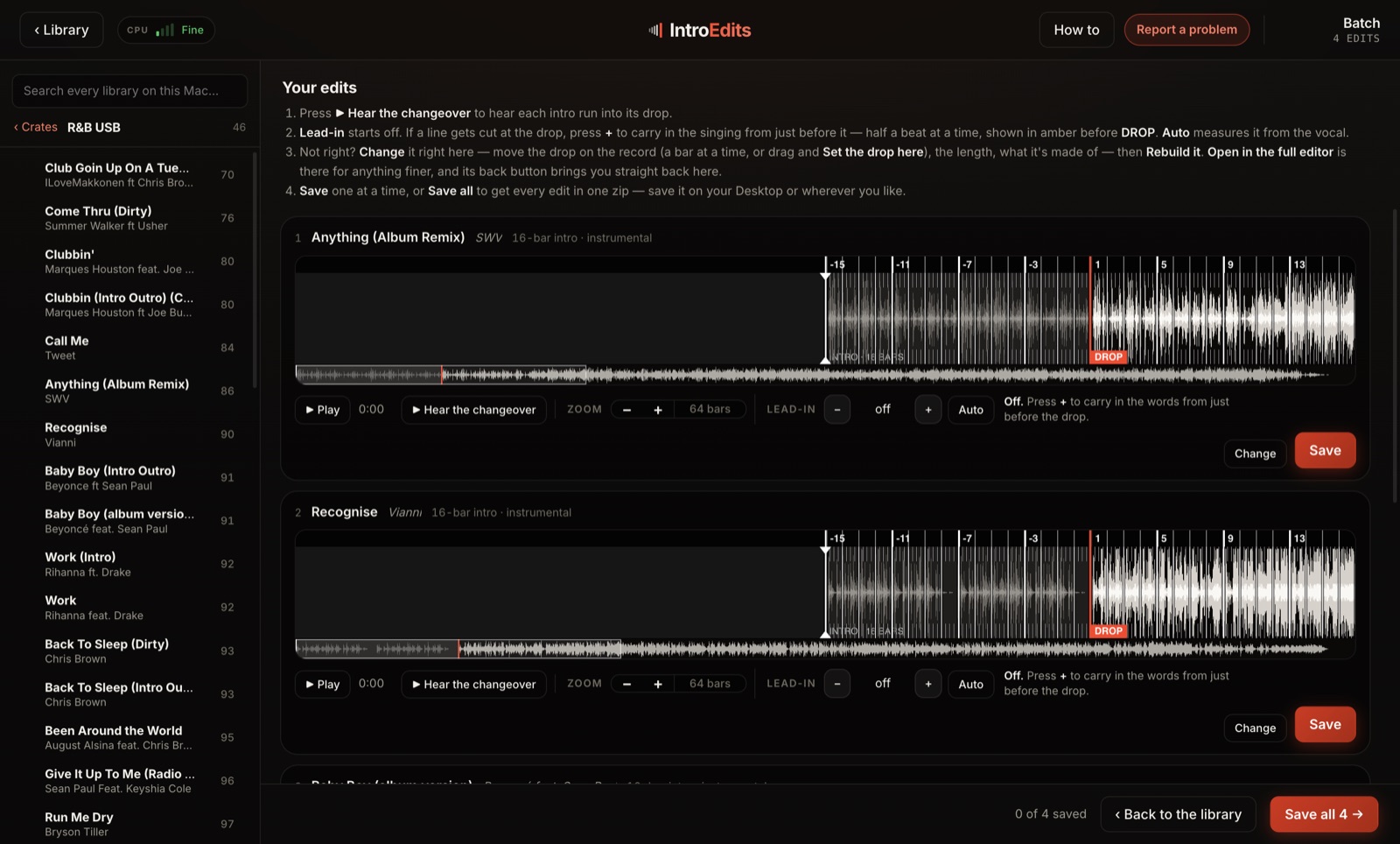
Hear every edit before you keep it
They build one after another on your own Mac. Play each changeover, carry the vocal in where a line would be cut, and save the lot in one zip.
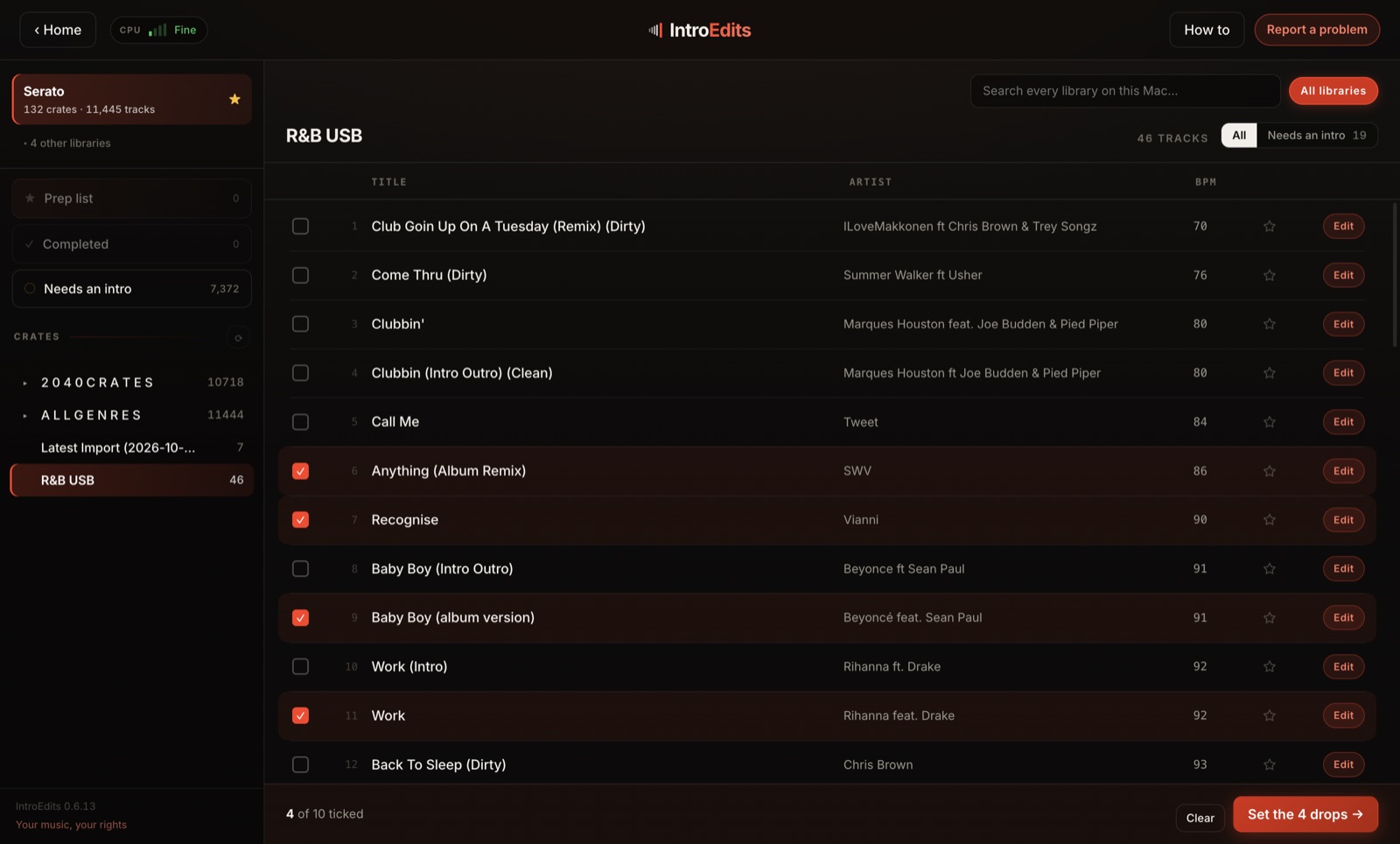
Your crates, already there
Serato, Rekordbox, VirtualDJ and Engine DJ, read the way that program shows them — and a Needs an intro list of every track in your library that has no intro yet.
- One track at a time
- Drop the file in yourself
- Sent to our server to separate
- 3 edits a month free
- Up to ten at a time, built one after another
- Straight from your Serato, Rekordbox, VirtualDJ or Engine crates
- Your music never leaves your Mac
- 3 a month free — unlimited with Pro
Encoding by LAME (wasm-media-encoders) and FFmpeg under the LGPL (source), with Xiph.Org's libvorbis, libopus and libogg (Vorbis, Opus, Ogg licences).